Google’s been the default search engine for so long that most of us never really questioned it. Type a query, scroll past the ads, click a few links, piece together an answer. It works, but it’s slow and lately, a chunk of those top results feel more like SEO-farmed filler than actual answers.
That’s the gap AI search engines are trying to fill. Instead of handing you a list of links and letting you do the digging, they read the web for you and give you a direct, sourced answer. Some of them cite where the info came from, some let you keep asking follow-up questions like you’re in a conversation, not doing a search.
This isn’t about ditching Google entirely it’s about knowing when a different tool actually gets you to the answer faster. Let’s go through the ones worth trying.
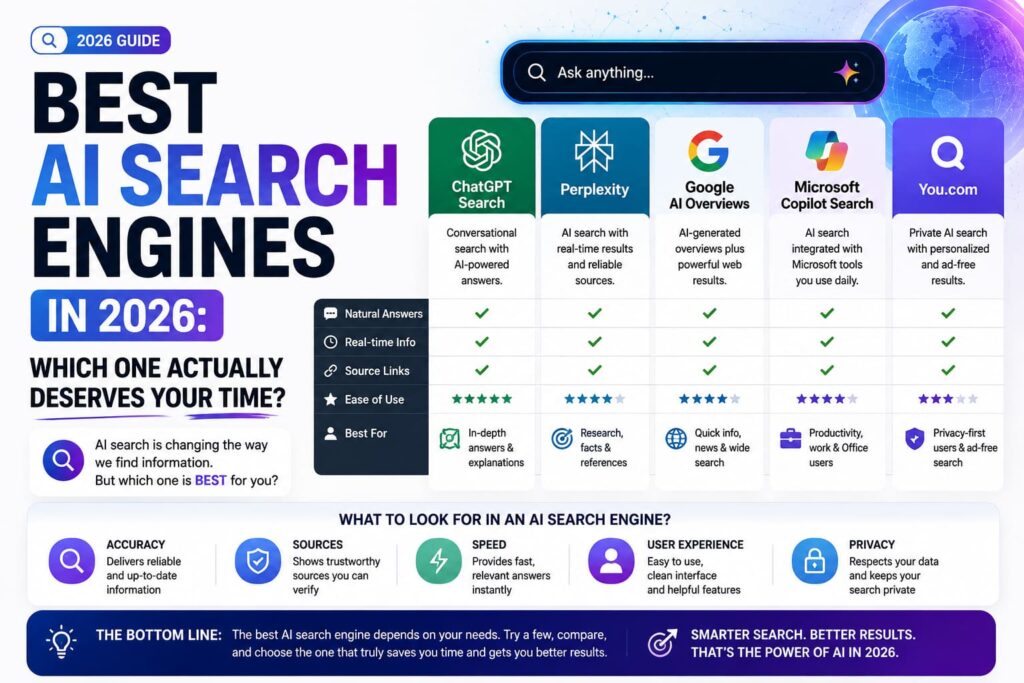
What Makes an AI Search Engine Different From Google?
Traditional search engines rank pages and let you sort through them. AI search engines skip a step they read multiple sources, summarize what matters, and hand you an answer with citations attached. The best ones don’t just guess; they pull from live web data so the answer isn’t stuck on some outdated training cutoff.
A few things they tend to do better than a normal search bar:
- Answer multi-part questions in one go, instead of forcing you to search twice
- Show you where the information came from, so you can verify it
- Let you ask a follow-up without starting over
- Cut down on the “click five links to find one paragraph” problem
They’re not perfect, though and we’ll get to that.
The Best AI Search Engines Worth Using Right Now
Here’s a breakdown of the ones actually worth your time, based on what each does well.
| Search Engine | Standout Feature | Best For |
|---|---|---|
| Perplexity AI | Clean, sourced answers with follow-up chat | Research and fact-checking |
| Google AI Overviews (SGE) | Built directly into regular Google search | Everyday quick queries |
| Bing Copilot | Combines search with chat-style assistance | Microsoft/Edge users |
| You.com | Customizable, app-like search experience | People who want more control |
| Claude with web search | Deep, well-reasoned answers with citations | Research-heavy or technical questions |
If you’re doing anything research-heavy comparing sources, digging into a technical topic Claude is worth trying specifically because it doesn’t just summarize the first result it finds; it actually reasons through what it’s reading before answering.
How to Pick the Right One for You
Honestly, most people don’t need just one. It depends on what you’re doing:
- Quick daily questions Google’s AI Overviews are fine; they’re already built into search you’re using anyway.
- Serious research or comparing sources Perplexity or Claude tend to give more thorough, citation-backed answers.
- Already living in the Microsoft ecosystem Bing Copilot integrates well if you’re on Edge or Windows.
- You want to customize how search behaves You.com lets you tweak things more than the others.
Trying two or three side by side on the same question is honestly the fastest way to figure out which one fits your workflow. According to Pew Research’s reporting on AI and search habits, a growing share of users are already mixing AI tools into their regular search routine rather than replacing one with another.
Where AI Search Engines Still Fall Short
They’re genuinely useful, but they’re not flawless. AI search tools can still misread a source, oversimplify a nuanced topic, or occasionally cite something that’s technically accurate but missing context. Treat the answer as a strong starting point, not gospel especially for anything medical, legal, or financial where getting it wrong actually matters.
It also helps to understand how these tools rank and pull information in the first place. If you’re curious about the mechanics behind it, our guide to how AI search ranking works breaks it down in more detail.
Bottom Line
The best AI search engine really depends on what you’re searching for. For quick, everyday questions, the AI features baked into Google are probably enough. For anything that needs real depth research, comparisons, technical questions tools like Perplexity or Claude tend to save you the most time. Try a couple, see which one actually fits how you search, and keep double-checking anything that really matters.
FAQs
1. Are AI search engines free to use? Most offer a solid free tier Perplexity, You.com, and Bing Copilot all work without payment for basic use. Heavier or unlimited use usually needs a paid plan.
2. Do AI search engines replace Google completely? Not really, and most people don’t use them that way. They’re better for direct answers and research; Google still wins for browsing lots of options, like shopping or local search.
3. Can I trust the answers from an AI search engine? Mostly, yes, especially when it cites sources but it’s still worth double-checking anything important. AI can misread context or oversimplify a nuanced topic.
4. Which AI search engine gives the most accurate answers? Perplexity and Claude are generally seen as strong for sourced, well-reasoned answers, though accuracy can vary depending on the topic and how the question is phrased.
5. Is Bing Copilot better than Google’s AI Overviews? Not necessarily better just different. Copilot leans more conversational and works well if you’re already using Edge, while Google’s version is built right into the search you’re already doing.