If you run a YouTube channel by yourself, you already know the drill you’re the writer, the editor, the thumbnail guy, the SEO person, and somehow also the one who has to be on camera looking energetic at 11pm. It’s a lot for one person. That’s probably why so many creators have quietly started leaning on AI tools just to survive the workload, honestly.
You don’t need to flip your entire workflow overnight though. Most creators just pick one tool that fixes their biggest headache usually editing or thumbnails and go from there. So let’s talk about what’s actually worth your time, not just what’s trending on Twitter this week.
Why This Has Become Such a Big Deal
A few years back, most of this stuff needed either a full team or you personally losing sleep over it. Now a good chunk of that work scripts, captions, voiceovers, thumbnails, chopping a long video into Shorts can be sped up a lot with the right software. There’s basically a tool for every annoying step now.
That said, AI isn’t replacing the creative part, at least not in any way that actually works well right now. It’s more that it clears out the boring stuff so you have more time to actually film and talk to your audience instead of being stuck in an editing timeline until 1am wondering why you started a YouTube channel in the first place.
Things Worth Checking Before You Commit to a Tool
Not everything labeled “AI-powered” is actually worth adding to your setup. Before you sign up for yet another platform, it’s worth asking:
- Does this genuinely save time, or is it just one more thing to learn?
- Is the free plan actually usable, or is it bait for a $40/month upgrade?
- Does it fit into what I already use Premiere, CapCut, whatever?
- Is the output good enough to use straight away, or will I be fixing it for an hour anyway?
- Does it even work for what I make long-form, Shorts, both?
Tools That Are Actually Worth Using
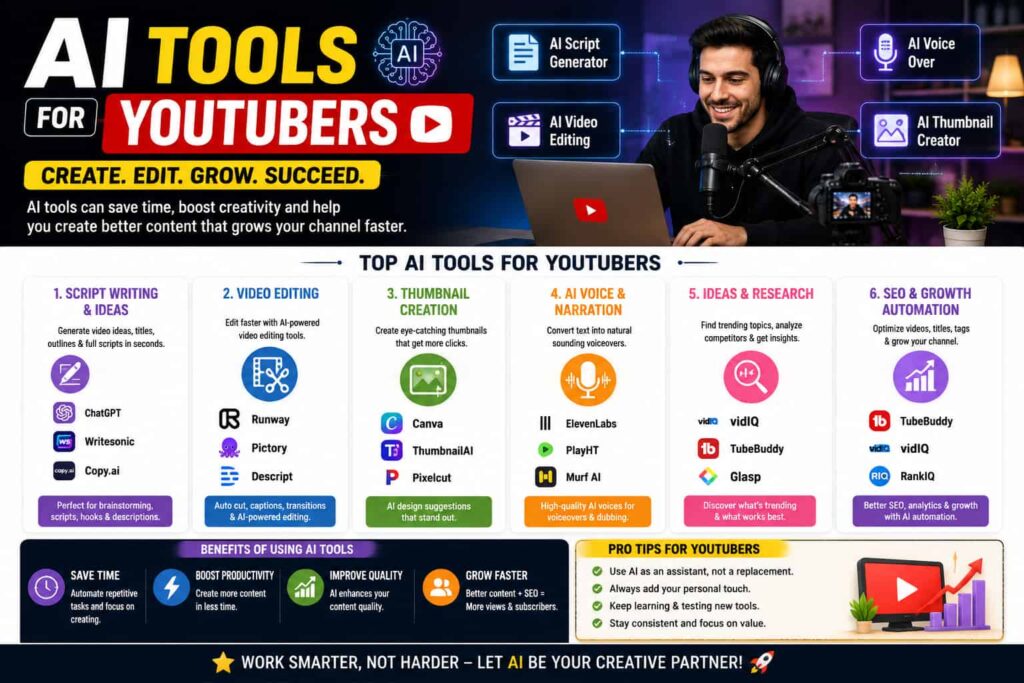
VidIQ or TubeBuddy for SEO and figuring out why a video flopped. Both use AI to suggest titles, tags, and keywords based on what’s actually working on YouTube right now. Genuinely handy when a video underperforms and you’re not sure why these break down search competition for a topic so you’re not just guessing.
Descript for editing without touching a real timeline. Descript lets you edit video by editing the transcript, which sounds odd until you actually try it once. Delete a sentence from the text, and the matching video clip disappears too. It’s also decent for slicing long videos or podcasts into short clips for Shorts.
ElevenLabs for voiceovers when you don’t want to record. If recording narration yourself isn’t your thing, or you need it in another language, ElevenLabs spits out natural-sounding AI voiceovers from text. Good for explainer or tutorial content where you’d rather not re-record the same line five times.
Canva for thumbnails when you’re not a designer. Canva’s AI features can suggest layouts, strip backgrounds, and resize things instantly. It’s not the fanciest design tool around, but it’s fast and when you’re posting weekly, fast wins over fancy most days.
ChatGPT or Claude for outlining and getting unstuck. Handy for structuring a video, brainstorming titles, or just getting past a blank page. Just don’t paste the output straight into your script it usually sounds like an AI wrote it, because it did. Rewrite it in your own voice.
Quick Comparison Table
| Tool | Best For | Free Plan | Learning Curve |
|---|---|---|---|
| VidIQ / TubeBuddy | SEO, keyword research | Yes (limited) | Low |
| Descript | Editing, repurposing clips | Yes (limited) | Medium |
| ElevenLabs | AI voiceovers | Yes (limited) | Low |
| Canva | Thumbnails, graphics | Yes | Low |
| ChatGPT / Claude | Scripting, brainstorming | Yes | Low |
Mistakes Creators Keep Making With These Tools
The big one relying on AI for literally everything, including the stuff that needs your actual personality. Audiences can tell when a script sounds generic, and it quietly hurts trust over time even if nobody says anything in the comments.
Second mistake: trying five new tools in the same week. That usually means none of them actually get used properly, and you’re back to your old workflow within a month. Add one thing, get used to it, then move on to the next.
And please, actually check the AI-generated captions or voiceover before you hit publish. It’s a starting point, not a finished product auto-captions especially love turning perfectly normal words into something embarrassing.
Getting More Out of These Tools
Start with whatever eats the most of your time for most people that’s editing or thumbnails. Fix the biggest bottleneck first and the rest tends to feel less overwhelming.
Keep your own voice in scripts even when AI drafts the first version edit it, don’t just copy-paste it live. And it’s worth revisiting your tool stack every few months anyway, since this space moves fast and last year’s favorite tool might already have a better replacement out there.
If you’re also trying to tighten up your content strategy beyond just the tools, our guide on YouTube SEO basics for new creators goes deeper into keyword strategy alongside what’s covered here.
Frequently Asked Questions
Do I need to pay for AI tools to grow on YouTube? Not really, at least not at first. Most tools here have decent free plans, especially for smaller channels. Paid tiers start making sense once you’re publishing regularly and actually feeling the time crunch.
Can AI just write my whole script for me? It can draft something, but it usually needs a rewrite to sound like an actual person you instead of a chatbot. Viewers pick up on that faster than you’d think.
What’s the best AI tool for thumbnails? Canva’s a solid place to start quick, mostly free, no design background needed. Some creators move to more advanced tools later once they know their exact style.
Is it fine to use an AI voice instead of recording myself? Yeah, especially for tutorials or explainer videos where your face isn’t really the point. Just make sure the voice actually matches your channel’s vibe.
Does using AI tools make my channel feel less authentic? Not if you’re using them to support your work, not replace yourself entirely. The channels that struggle are usually the ones posting raw AI output without editing any of it.
Final Thoughts
AI tools won’t build a successful channel by themselves, but they’ll genuinely cut down the hours you spend on editing, research, and design hours you could put back into actually making better videos. Pick one tool that solves your worst bottleneck, get comfortable with it, and build from there instead of trying to overhaul everything at once.
For more on how creators are actually using AI in their workflows, Google’s official YouTube Creator resources and HubSpot’s guide to AI in content marketing are both worth a read.