Picture a finance team at some mid-size logistics company. For years, reconciling invoices ate up three full days every single month three actual workdays, gone, just matching numbers by hand. Then they plugged in an automation tool, and that same task shrank down to maybe an hour of review. That’s basically the whole pitch for AI-powered automation, captured in one small, very ordinary example.
This isn’t the clunky, rule-based automation from a decade ago that broke the moment something unexpected happened. What’s running now is built around recognizing patterns rather than following fixed steps. A system like that can actually deal with the messy, unpredictable parts of business operations that used to need a human babysitting every step.
If you’re trying to figure out where business process automation actually fits into your operations, or you’re just curious how AI-powered automation improves business productivity in practice, this breaks down what’s genuinely working right now, not the hype version.
From Rigid Scripts to Systems That Actually Adapt
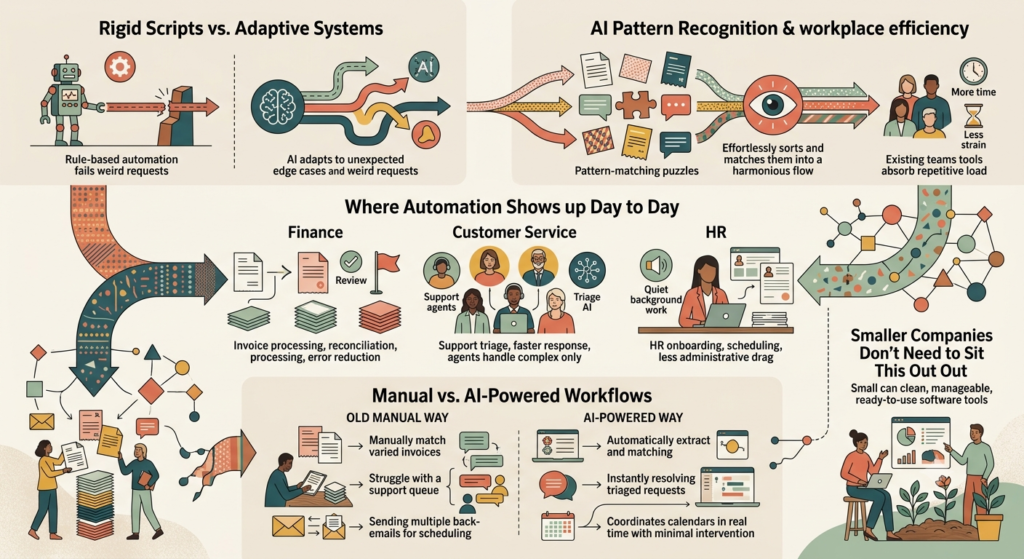
Go back ten years, and automation tools followed a script, plain and simple. If X happened, the system did Y, nothing more. The moment something fell outside that script a weird customer request, an invoice formatted slightly differently, an edge case nobody bothered coding for the whole thing stalled out, and a human had to step in manually.
AI-powered automation behaves differently. It picks up on patterns over time, so when something unusual shows up, it doesn’t just freeze. A customer support ticket that doesn’t fit the usual template still gets routed correctly, because the system reads intent rather than matching keywords. An invoice formatted slightly differently than the last thousand still gets processed, no manual re-entry required.
That shift matters more than it sounds. Workplace efficiency used to mean hiring more people whenever volume went up. Now it increasingly means giving existing teams tools that absorb the repetitive load, so headcount doesn’t need to grow at the same pace as the work does.
Where This Is Actually Showing Up Day to Day
Finance teams are a good example. Invoice processing, expense approvals, reconciliation the stuff that used to eat hours of someone’s week now mostly runs itself, with humans stepping in only for exceptions or unusual amounts. The error rate tends to drop, too, since machines don’t get tired at 4 pm on a Friday the way people do.
Customer service has shifted in a similar direction. AI tools triage requests before a human agent even sees them. Simple stuff gets resolved instantly. Anything genuinely complicated still gets escalated to a person, but that person now starts with full context instead of from zero.
HR departments are leaning on this too, mostly for onboarding and scheduling. Verifying documents, scheduling interviews, answering the same policy questions for the hundredth time all of that used to mean a slow back-and-forth over email. Now it mostly happens through workflows that just quietly run in the background.
Manual Workflows vs. AI-Powered Workflows
| Business Function | The Old Manual Way | The AI-Powered Way | What Actually Improves |
| Invoice & Expense Processing | Manual entry and cross-checking by accounting staff | Automated extraction and matching, flagging only exceptions | Hours saved weekly, fewer costly errors |
| Customer Support Routing | Every ticket goes through a human queue first | AI triages and resolves simple requests instantly | Faster response times, agents handle only complex cases |
| Scheduling & Onboarding | Back-and-forth emails and manual calendar checks | Automated scheduling tools coordinating in real time | Less administrative drag, smoother new-hire experience |
Looking across these examples, the common thread isn’t replacing people. It’s removing the parts of the job that drain energy without ever really needing a human brain behind them.
Why Smaller Companies Don’t Need to Sit This Out
There’s a common assumption that this kind of tech is reserved for big corporations with deep IT budgets. That’s not really true anymore. Most business process automation tools today come as ready-to-use software, no custom engineering required. A small team can plug in a workflow tool, connect it to whatever systems they already use, and start seeing time saved within weeks rather than months.
The barrier used to be cost and complexity. Now it’s mostly just awareness knowing which tasks are actually worth automating, and which ones still genuinely need a person’s judgment behind them.
Frequently Asked Questions
What exactly counts as “AI-powered automation,” versus regular old software automation?
Regular automation just does whatever it’s told and nothing else follow the rule, repeat forever. AI-powered automation reads patterns and context instead, which means it can handle the weird edge cases that would make a stricter, rule-based system grind to a halt.
Will this actually replace jobs, or just change what people spend their time on?
Mostly the second one, at least for now. Repetitive, low-judgment tasks get absorbed by automation, while people shift toward work that needs real decision-making or relationship-building, the kind of thing automation still struggles with.
How long does it typically take to see results after implementing automation tools?
Honestly, it depends a lot on what you’re automating. Document processing and customer support routing tend to show savings within the first couple of weeks. Bigger integrations that touch multiple systems usually take longer to fully pay off, sometimes a few months.
Is this kind of automation only useful for huge companies with big budgets?
Not anymore. Plenty of affordable SaaS tools exist specifically for small and mid-sized businesses, so nobody needs a massive IT department or a six-figure budget to start automating meaningful chunks of their workflow.
What’s the biggest mistake businesses make when adopting automation?
Trying to automate everything at once, usually. The smarter approach is picking one or two genuinely repetitive, time-draining processes first, getting those working well, and expanding from there once the team actually trusts the system.
Conclusion
Most of this is already running quietly in the background at companies that are pulling ahead of their competitors right now, whether their employees notice it or not. And the businesses seeing real gains in workplace efficiency aren’t necessarily the biggest or best-funded ones; they’re just the ones willing to hand off the repetitive grind to a system built to handle it.
Start small if that feels safer. Pick one workflow that’s been draining your team’s time for years, automate that piece first, and build from there. The gains tend to compound once the right pieces are actually in place.