Most freelancers don’t lose time on the actual work they lose it on everything around the work. Writing proposals, chasing invoices, formatting documents, transcribing calls, tweaking designs for the third time. None of that is hard, it’s just constant, and it eats into hours you could be billing. That’s where AI tools have quietly become less of a novelty and more of a default part of running a freelance business.
You don’t need ten different subscriptions to see a difference. A handful of well-chosen tools, matched to the parts of your workflow that actually waste time, is usually enough. Here’s how to think about building that stack.
Writing and Client Communication
This is where most freelancers get the fastest return, simply because writing (proposals, emails, contracts, reports) touches almost every part of the job.
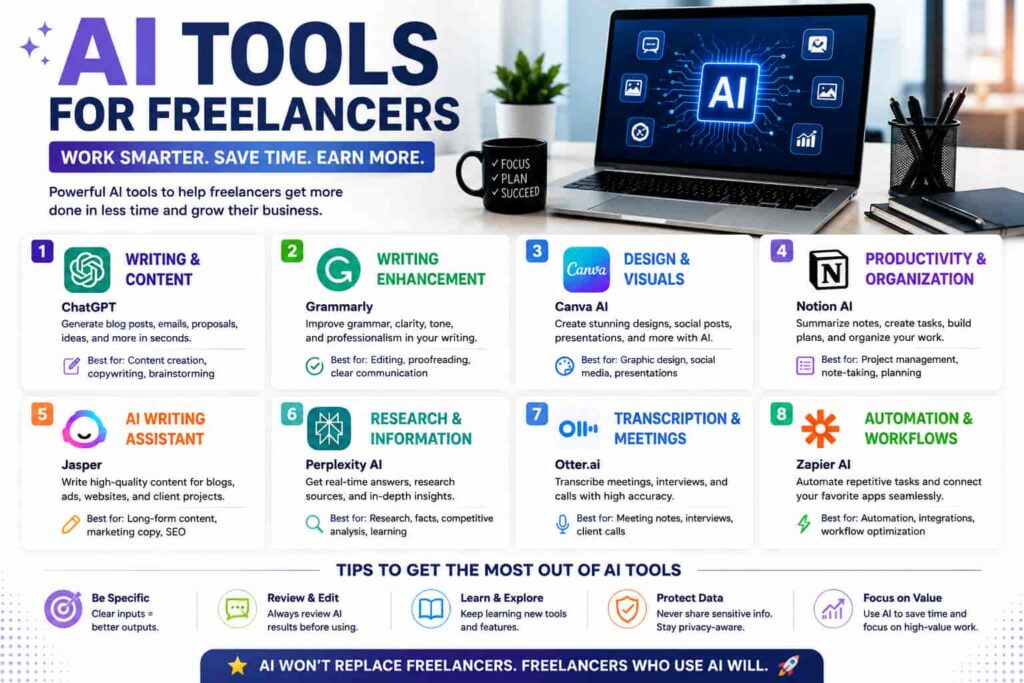
Tools like Claude and ChatGPT are the obvious starting point here useful for drafting proposals, tightening up client emails, brainstorming, and turning rough notes into something presentable. Grammarly sits alongside these as a lighter-weight editing layer, catching tone and clarity issues before anything goes out the door.
The trick with AI writing tools isn’t using them to write everything from scratch it’s using them to get past the blank page and then editing in your own voice. Clients notice generic, AI-flavored writing pretty quickly, so treat these tools as a first draft partner, not a final one.
Design and Visual Work
Not every freelancer needs Photoshop-level tools for every project, and that’s exactly the gap AI design tools fill.
Canva AI is the practical middle ground for most freelancers social graphics, presentation decks, and marketing assets without a steep learning curve. For anything needing original imagery, Midjourney remains a common choice for hero images, concept art, or blog illustrations that would otherwise mean licensing stock photos.
Coding and Development
For freelance developers, GitHub Copilot has become close to standard, since it speeds up boilerplate code and catches small errors before they become debugging sessions. It won’t replace understanding your own codebase, but it noticeably cuts down time on repetitive parts of a build.
Research and Client Prep
Before a call or a proposal, having a clear, well-organized brief makes a real difference. Perplexity is commonly used for quick, sourced research when you need to get up to speed on a client’s industry fast, without spending an hour reading through search results manually.
Meetings and Notes
Sitting through a client call and trying to take notes at the same time is a losing game. Tools like Otter.ai and Fireflies.ai transcribe and summarize meetings automatically, pulling out action items so you’re not scrambling to remember what was agreed to three days later.
Automation and Admin
This is the category most freelancers underuse, and it’s often where the biggest time savings hide. Tools like Zapier or n8n connect the apps you already use, so things like new-client onboarding, invoice reminders, or file organization happen without you touching them each time.
For project and client management specifically, Notion AI and ClickUp AI help keep everything (deadlines, deliverables, client notes) in one place instead of scattered across email threads.
Quick Comparison: AI Tools by Category
| Category | Popular Tools | Best For |
|---|---|---|
| Writing & communication | Claude, ChatGPT, Grammarly | Proposals, emails, editing |
| Design | Canva AI, Midjourney | Graphics, presentations, imagery |
| Coding | GitHub Copilot | Faster, cleaner code |
| Research | Perplexity | Quick client and industry research |
| Meetings | Otter.ai, Fireflies.ai | Transcription, action items |
| Automation & admin | Zapier, n8n, Notion AI | Invoicing, onboarding, project tracking |
Building a Stack Without Overspending
You don’t need every tool on this list, and stacking too many subscriptions can quietly eat into the very time and money savings you’re chasing. A reasonable starting point for most freelancers looks like:
- One general-purpose AI assistant for writing and thinking through problems.
- One tool specific to your core skill (design, code, video, etc.).
- One tool for meetings or admin, since that’s usually the most invisible time drain.
From there, add tools only when a specific, recurring task justifies the cost not because a new tool launched this month. If you’re also working on pricing your services accurately as your output increases, our guide to setting freelance rates is worth a look alongside this.
A Word on Client Perception
Clients in 2026 generally expect freelancers to use AI in some form, but the ones who stand out are the ones who use it well faster turnaround, cleaner deliverables, fewer generic-sounding drafts. The tools that earn their keep are the ones that save more time than they take to set up and manage. If a tool takes longer to configure than it saves you weekly, it’s probably not worth keeping.
FAQs
What are the most useful AI tools for freelancers just starting out? A general writing assistant like Claude or ChatGPT, plus one tool specific to your niche (design, coding, or video), covers most early needs without overspending.
Can AI tools replace a freelancer’s actual skills? No they speed up repetitive parts of the work (drafting, transcribing, formatting) but still need human judgment, editing, and client understanding to produce work worth paying for.
Are free AI tools good enough, or is it worth paying? Free tiers are fine for testing a tool, but most freelancers find the paid tiers pay for themselves quickly once a tool is handling a real weekly task.
How much can AI realistically save a freelancer per week? Estimates vary, but many freelancers report saving somewhere between 5 and 15 hours a week once AI tools are properly integrated into daily workflows, largely on admin and drafting tasks.
Do clients mind if I use AI in my freelance work? Most don’t, as long as the final output is high quality and reviewed by you. Problems tend to arise when AI output is delivered without editing or fact-checking.
Bottom Line
The freelancers getting the most out of AI aren’t the ones using the most tools they’re the ones who matched a small set of tools to the specific tasks eating their time. Start with writing and admin, since that’s where most freelancers lose the most unbilled hours, then build outward based on your actual workflow, not whatever tool is trending that week.
Sources referenced: