I’ll be honest, I’ve abandoned more to-do list apps than I can count. Not because they didn’t work, but because they were just… static. I’d add fifteen tasks in the morning, feel briefly organized, and then spend the day deciding which one to actually do while new stuff kept piling on top. The list never adjusted itself. It just sat there, growing.
That’s the gap an AI task management tool is actually trying to close a list that reacts instead of one you have to babysit.
What Is an AI Task Management Tool, Really
A regular to-do list is passive. You type something in, you check it off, and that’s the entire relationship. It doesn’t know what’s urgent, doesn’t know your calendar is already full on Thursday, and definitely doesn’t notice that you’ve been ignoring the same task for two weeks straight.
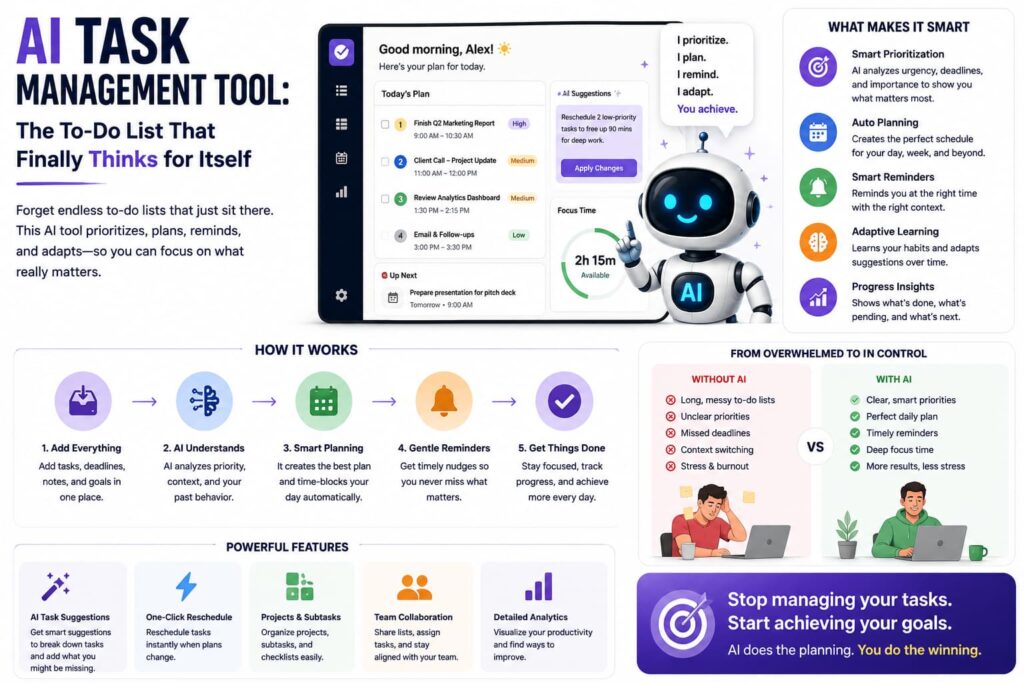
An AI task management tool takes that same list and adds a layer of actual thinking on top. It looks at deadlines, workload, and how tasks depend on each other, then tells you what to actually work on right now instead of dumping everything on you at once. Some go even further and place tasks directly on your calendar, turning a plan into an actual schedule instead of a wish list.
How It Actually Works
From there, prioritization kicks in. The AI looks at deadlines, importance, and dependencies, then decides what deserves your attention today versus what can wait quietly replacing the minutes you used to spend every morning just staring at your list.
Most of these tools start with capture. You type something in plain language “set up a call with the design team next Tuesday” and instead of filling out three fields and picking a due date manually, the tool just creates the task, figures out the date, and files it correctly. No forms, no friction.
Then comes scheduling. The better tools block actual calendar time for your priorities, so there’s no gap between planning something and doing it. As things shift during the day a new request, a meeting running long the AI reorganizes the plan instead of leaving you to shuffle it manually.
Finally, there’s tracking. Instead of a static list nobody checks after the meeting, a shared view shows what the team is actually working on, so surprises don’t show up two days before a deadline.
What’s Actually Running Under the Hood
Part What it’s doing
Natural language input Turns a typed sentence into a structured task automatically
Prioritization engine Weighs urgency, deadlines, and dependencies to rank tasks
Auto-scheduling Blocks calendar time for high-priority work
Adaptive replanning Reorganizes the day when priorities or workload shift
Progress tracking Gives a shared view of what’s done and what’s stuck
Integrations Connects with calendars, Slack, email, and other tools
Why This Matters More Than It Sounds
Here’s what actually surprised me: research suggests knowledge workers spend a huge chunk of their time well over half, by some estimates on coordination work rather than the job they were hired to do. Status updates, deciding what to prioritize, chasing who owns what. None of that is the real work; it’s just overhead around it.
An AI task management tool chips away specifically at that overhead. It’s not making you smarter or more disciplined it’s removing the constant low-level decision-making that quietly eats your day.
Static To-Do List vs. AI Task Manager
Static To-Do List AI Task Management Tool
Prioritizes for you No Yes
Adjusts when plans change No Yes
Blocks calendar time automatically No Usually
Understands task dependencies No Yes
Works from plain language input Rarely Yes
Who Actually Gets the Most Out of This
Individuals juggling a messy personal workload benefit almost immediately, since the tool takes over the “what should I do first” thinking. Teams get something just as valuable an honest view of who’s overloaded and who has room, instead of finding out in a status meeting that something’s been stuck for a week. And people running structured goals benefit from tools that connect the big-picture target directly to the small tasks meant to get them there.
Worth Knowing Before You Commit to One
Not every tool does this equally well, and it’s easy to get pulled in by a feature list without checking whether the prioritization logic is any good. Test how a tool handles a genuinely messy week conflicting deadlines, a sudden urgent request rather than a calm day with three neat tasks. It’s also worth giving it real time, since these tools tend to improve once they’ve learned your actual patterns.
If a big part of your workload also involves meetings and the decisions that come out of them, it’s worth pairing this with a proper AI meeting assistant, since a lot of tasks are born in conversations long before they ever make it onto a list.
The Bottom Line
An AI task management tool isn’t really about adding more automation for the sake of it it’s about closing the gap between having a plan and actually following it. Between smart prioritization, auto-scheduling, and a system that adjusts when your day inevitably doesn’t go as planned, these tools take over the coordination work that was never really the job in the first place.
FAQs
How is an AI task management tool different from a normal to-do list app? A normal to-do list just stores tasks you manually add and check off. An AI task management tool prioritizes those tasks for you, schedules time for them, and adjusts automatically as things change.
Can I really just type a task in plain language instead of filling out a form? Yes, most modern AI task tools support this. Typing something like “call the vendor Friday morning” is usually enough for the tool to create and file the task correctly.
Will an AI task manager actually put tasks on my calendar? Many do. Auto-scheduling is one of the more common features, blocking dedicated time for your highest-priority tasks instead of leaving you to fit them in manually.
Are these tools useful for teams, or just individuals? Both. Individuals benefit from personal prioritization and scheduling, while teams get shared visibility into workload, so problems surface before a deadline is missed.
Do I need to switch my entire workflow to use an AI task manager? Not usually. Many tools integrate with what you already use, like Google Workspace, Slack, or existing project boards, so you can layer AI features in gradually instead of starting from scratch.
Further reading:
TasksBoard – AI Task Management: How to Work Smarter with AI Tools
Teamwork.com – 5 Best AI Task Managers in 2026
Fit Small Business – AI Task Managers: The Top 9 in 2026