Ask any social media manager what “AI tool” means to them and you’ll probably get an eye roll before an actual answer. For a while, it felt like every tool on the market was just a caption generator wearing a different logo. That’s changed more than people give it credit for. The tools worth using now handle a lot more than writing scheduling, sentiment tracking, reporting, even drafting replies to comments which also means picking the right one matters more than it used to.
So here’s a practical breakdown of what these tools actually do, organized by the job they solve, not just another ranked list.
Why This Category Actually Matters Now
Social media managers today are expected to do what used to take a small team content ideas, captions, images, scheduling, reading analytics, and managing community replies often as one person juggling five platforms at once. AI tools didn’t create that expectation, but they’re the reason it’s become survivable. Recent industry surveys suggest the vast majority of social media managers now use AI tools daily, not as an experiment but as a baseline part of the job.
The Core Categories, and What Each One Actually Solves
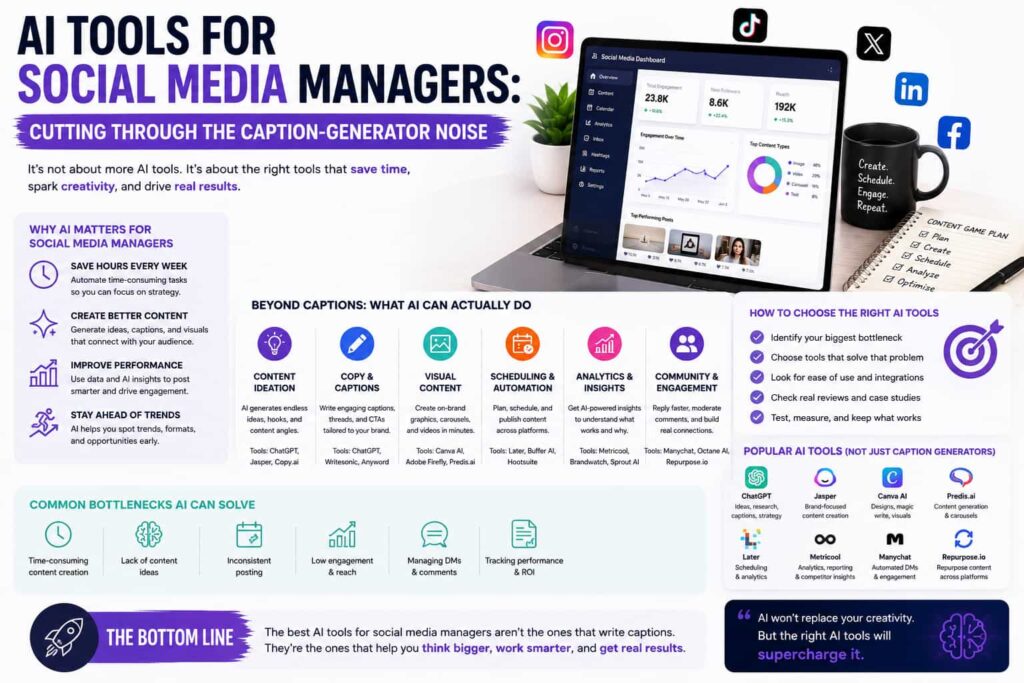
Content ideation and captions. This is the most crowded category, and for good reason staring at a blank post box every day is exhausting. Tools here generate topic ideas based on trends and your niche, then draft platform-specific captions that account for the fact that Instagram, LinkedIn, and X genuinely expect different tones. The better tools detect which platform you’re writing for and adjust the output automatically instead of giving you one generic caption to awkwardly reuse everywhere.
Scheduling and optimal timing. Beyond just queuing posts, AI-powered scheduling looks at your actual audience engagement patterns and suggests when to post based on real data instead of generic “best time to post” advice that doesn’t account for your specific audience.
Sentiment and community management. This is where things get genuinely useful beyond content creation. Tools in this space analyze mentions and messages in real time, flag sentiment shifts, and suggest response drafts for customer service-style interactions happening in comments and DMs which matters a lot once a brand’s social presence starts doubling as a support channel.
Reporting and analytics. Instead of exporting a spreadsheet and manually interpreting it, modern tools turn raw engagement data into plain-language insights what worked, what didn’t, and why cutting out hours of manual analysis before a report even gets written.
Content repurposing. A genuinely underrated category. Some tools can take one long-form piece, like a blog post, and break it into dozens of platform-specific posts, pulling out the strongest hooks and phrases instead of just chopping the text into smaller chunks.
What’s Actually Running Behind These Tools
Category What It Handles Time Saved On
Caption generation Platform-specific post drafts Writer’s block, tone-matching per platform
Scheduling Posting time optimization Manual calendar planning
Sentiment analysis Reading tone across mentions/messages Manual comment/DM monitoring
Reporting Turning data into insights Manual spreadsheet analysis
Repurposing Turning one asset into many posts Rewriting content per channel
Full Suites vs. Focused Tools
Full Management Suite Focused AI Tool
Covers scheduling + engagement + reporting Yes Usually just one function
Best for Teams managing multiple accounts/channels Solo creators, small teams
Setup complexity Higher Lower
Cost Higher, often per-seat Lower, sometimes free tier
Example use case Agency managing 10+ client accounts Solo creator needing caption help
How to Actually Pick Without Tool Fatigue
The mistake a lot of teams make is stitching together five separate tools one for captions, one for scheduling, one for analytics when a single platform could cover most of that already. In 2026, the more capable tools increasingly combine multiple functions, which matters because your scheduling tool being able to see your actual performance data leads to better posting-time recommendations than a standalone scheduler guessing in isolation.
That said, a full management suite isn’t automatically the right call. If your day is mostly approvals, publishing queues, and juggling several networks, an all-in-one platform earns its cost. If you’re a solo creator or a small team whose main need is caption help and basic scheduling, a cheaper, more focused tool usually gets the job done without paying for governance and reporting features you’ll never touch.
It’s also worth being honest about what AI still can’t fully replace here. Brand voice, creative judgment, and genuine community engagement still benefit heavily from a human’s actual read on the room AI handles the repetitive scaffolding around that work well, but it works best alongside human strategy, not instead of it.
If social media is just one piece of a broader marketing operation you’re managing, it’s worth also looking at AI email automation tools, since a lot of social and email workflows content calendars, campaign timing, audience segments end up overlapping more than people expect.
The Bottom Line
AI tools for social media managers have moved well past “just write me a caption.” The genuinely useful ones now handle scheduling, sentiment tracking, reporting, and repurposing, cutting out hours of manual work that used to require a whole team. The right pick isn’t the tool with the longest feature list it’s the one that matches how many channels you’re actually managing and how much of the workflow, beyond just writing, you need help with.
FAQs
Do I need a full social media management suite, or just an AI writing tool? It depends on scale. Solo creators or small teams often only need a focused caption or scheduling tool, while teams managing multiple accounts benefit more from an all-in-one suite with engagement and reporting features included.
Can AI tools actually respond to comments and DMs on their own? Many tools can draft suggested replies based on sentiment and context, but most social media managers still review responses before they go out, especially for anything customer-facing or sensitive.
Will using AI tools make my social content sound generic? It can, if you rely on default output without customization. The better tools let you upload a brand voice or past content so generated captions match your actual tone instead of sounding templated.
Are there good free AI tools for social media management? Yes, several tools offer free tiers covering core features like basic scheduling and caption generation, though advanced analytics, sentiment analysis, and multi-account management usually require a paid plan.
How many AI tools does a social media manager actually need? Most people don’t need more than two or three platforms covering the full workflow content creation, scheduling, and analytics rather than a separate tool for every individual task.
Further reading:
Zapier – The 9 Best AI Tools for Social Media Management in 2026
Netlz – The Best Social Media AI Tools in 2026
Digital Applied – AI Social Media Management Tools 2026