I used to be one of those people with a notebook for everything one for work, one for random ideas, one I swore I’d “properly organize” someday and never did. Half of what I wrote down I never looked at again, and the other half I couldn’t find when I actually needed it. That’s basically why AI note taking apps have taken off. It’s not that people forgot how to write things down. Writing was never really the hard part finding it again was.
Let’s get into what these apps actually do, how they work, and where they’re genuinely worth using.
What Is an AI Note Taking App, Exactly
An AI note taking app takes whatever you throw at it spoken words, a lecture, a voice memo, a messy paragraph typed at 2 a.m. and turns it into something clean, organized, and searchable. That’s different from a regular notes app, which just stores whatever you type, exactly as typed, with no real understanding of what it means.
The AI part shows up in a few places: transcribing audio into text, summarizing recordings into key points, tagging notes automatically, and letting you search by concept instead of exact words. So if you wrote about “quarterly budget concerns” three weeks ago and now search “money problems,” a good AI note app can still find it.
How These Apps Actually Work
It starts with capture. Some apps focus on typed notes and use AI mainly for organizing and connecting them. Others are built around audio lectures, meetings, interviews, voice memos and their first job is converting speech into text.
Once there’s text to work with, a language model takes over. This is where the real “intelligence” happens: pulling out the main points, cutting the fluff, and structuring things into something scannable instead of a giant wall of text. Some tools stop at a clean summary. Others go further and connect related notes together automatically, without you filing anything yourself.
Then there’s search, probably the most underrated part of the whole thing. Traditional note apps search for exact words. AI-powered ones search by meaning, so you don’t have to remember the exact phrase you used.
What’s Happening Behind the Scenes
Part What it’s responsible for
Capture Takes in typed text, voice, or audio recordings
Speech-to-text Converts spoken audio into a usable transcript
Summarization Turns long or messy input into a clean summary
Auto-organization Tags and links related notes automatically
Semantic search Finds notes by meaning, not just exact keywords
Sync Keeps everything consistent across devices
Not All AI Note Apps Are Built for the Same Job
This is where people get tripped up they pick a tool built for one use case and force it into another. A workspace app built for teams documenting decisions is very different from a lightweight app meant for personal thoughts. Some are meeting-first, built entirely around notes after a conversation. Others lean into research, letting you dump in PDFs and recordings, then ask questions across everything you’ve fed it. None of that makes one category better “best AI note taking app” really depends on what you’re trying to capture.
Students vs. Professionals vs. Personal Use
Students Professionals Personal Use
Main use Lecture capture, study guides Meeting notes, follow-ups Random ideas, journaling
Biggest win Lectures turned into study material Searchable history of decisions Never losing a thought again
Feature needed most Summarization, Q&A on material Action items, integrations Simplicity, low friction
Where People Actually Feel the Difference
The obvious win is time not spending twenty minutes after a lecture or call reconstructing what happened. But the bigger shift is how much less mental effort it takes to trust that something won’t just disappear. Knowledge workers reportedly lose several hours a week searching for or recreating information they already had once. An AI note taking app is basically an attempt to get that time back.
Students get lectures turned into study guides instead of half-finished handwritten notes. Professionals stop losing decisions in the gap between one meeting and the next. Even casual users benefit the person who wants to remember that great idea from the shower and actually find it again three weeks later.
Worth Knowing Before You Pick One
Not every app handles audio the same way, and not every “AI-powered” note app actually does semantic search some just slap AI branding on basic keyword matching. Test the search before committing, since that’s usually where the real difference shows up. Also check whether the app works offline or locally if privacy matters, since some process everything in the cloud by default.
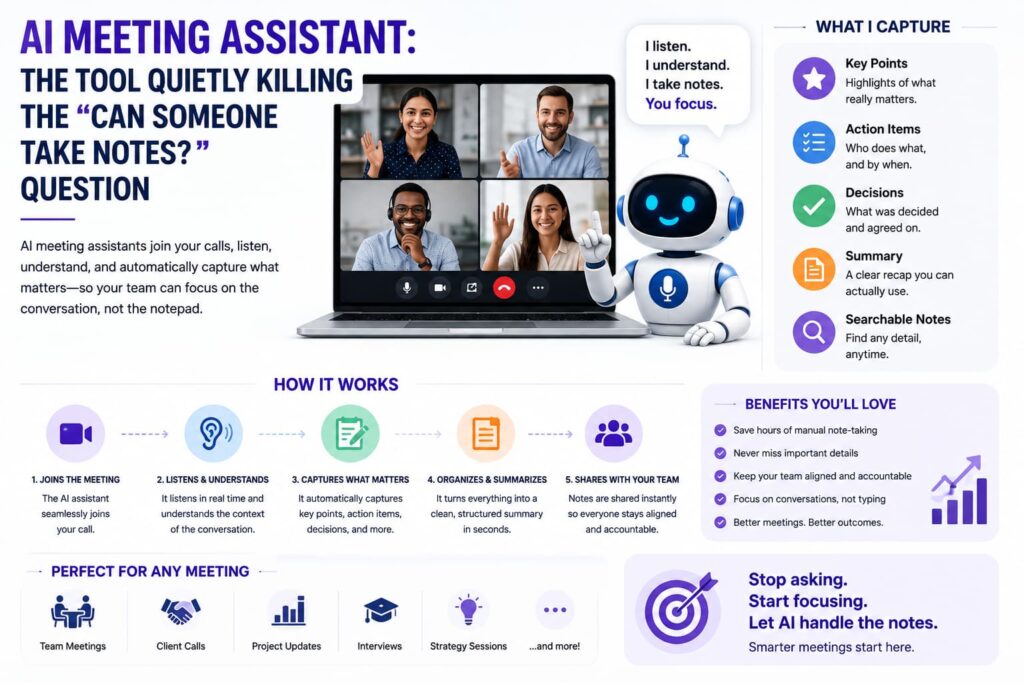
If you’re looking for something built around calls and meetings rather than general note-taking, it’s worth reading about how a dedicated AI meeting assistant works, since that’s a more specialized version of this same idea, focused entirely on conversations.
The Bottom Line
An AI note taking app isn’t about replacing your ability to write things down it’s about making sure whatever you capture doesn’t just sit there useless. Between automatic transcription, real summaries, and search that actually understands what you meant, these tools solve the part of note-taking that was always the actual problem: not writing things down, but finding it again when it matters.
FAQs
What makes an AI note taking app different from a regular notes app? A regular notes app just stores what you type. An AI note taking app can transcribe audio, summarize content, organize notes automatically, and search by meaning instead of exact words.
Can these apps handle audio and lectures, not just typed notes? Yes, many are built for that converting recorded audio into transcripts and summarizing them into structured notes or study guides.
Are AI note taking apps good for students? Yes, especially ones that turn long lecture recordings into concise summaries or let you ask questions about the material afterward.
Is my data private when using an AI note taking app? It depends on the tool. Some process everything in the cloud, while others offer local or offline options. Check an app’s data policy before storing sensitive notes.
Do I need a different app for meetings versus personal notes? Not necessarily, but dedicated tools tend to do each job better a meeting-first app handles action items better, while a general note app is more flexible for personal use.
Further reading:
Lindy – 9 Best AI Note-Taking Apps, Tested and Ranked
Top AI Skills – Best AI Note Taking Apps in 2026
Toolradar – Best AI Note Taking Apps 2026