Ask any teacher what eats their week, and lesson planning rarely tops the list it’s the stuff around it. Writing parent emails. Building leveled worksheets for six different reading levels in one class. Grading the same rubric forty times. None of it is difficult work, it’s just relentless, and it’s exactly the kind of task AI tools have gotten genuinely good at handling.
The teachers seeing real time savings in 2026 aren’t the ones using AI for everything they’re the ones who picked a couple of tools for their biggest time drains and stuck with them. Here’s how to think about building that toolkit without drowning in another five subscriptions.
Where AI Actually Saves Teachers Time
Most classroom workload breaks down into a handful of repeating jobs:
- Lesson planning building units, objectives, and materials aligned to standards.
- Differentiation adjusting the same content for different reading levels or needs.
- Grading and feedback reviewing student work against a rubric.
- Classroom management seating charts, behavior tracking, attendance.
- Communication parent emails, progress updates, newsletters.
AI tools tend to specialize in one or two of these rather than doing all of them equally well, which is why most teachers end up combining a general-purpose tool with one or two subject-specific ones.
Best AI Tools for Teachers by Task
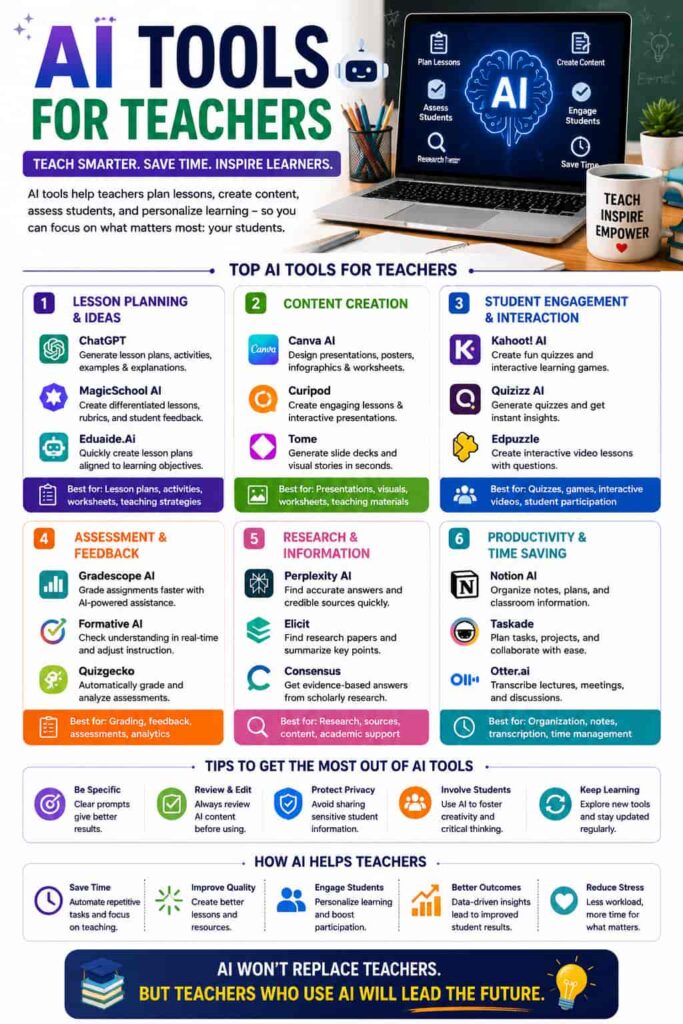
MagicSchool AI Often considered the category leader for lesson planning specifically, with a large library of generators covering everything from lesson plans to IEP support and differentiated materials. Its free tier is usable on its own, and paid plans unlock the full toolset.
ChatGPT or Claude General-purpose assistants that most teachers reach for first, mainly because of their flexibility. Useful for drafting parent emails, rewording a lesson explanation for different grade levels, or just thinking through how to structure a unit.
Diffit Built specifically for turning any text into leveled reading materials, which is genuinely useful for classrooms with a wide range of reading abilities and would otherwise take hours to rewrite manually.
Brisk Teaching A Chrome extension-based tool that’s popular for inline grading and feedback directly inside Google Docs or Classroom, without needing to switch between tabs.
Khanmigo (Khan Academy) Geared more toward one-on-one tutoring support for students, but also includes teacher-facing tools for lesson support and questioning strategies.
Canva AI Not education-specific, but widely used by teachers for building worksheets, slides, and classroom visuals quickly without needing design skills.
Quick Comparison: AI Tools by Classroom Task
| Task | Popular Tools | Best For |
|---|---|---|
| Lesson planning | MagicSchool AI, ChatGPT | Standards-aligned plans, units |
| Differentiation | Diffit, MagicSchool AI | Leveled texts, IEP-friendly materials |
| Grading & feedback | Brisk Teaching, ChatGPT | Inline comments, rubric-based review |
| Classroom management | Taskade, ClassDojo | Seating charts, behavior tracking |
| Student tutoring support | Khanmigo | One-on-one, in-the-moment help |
| Visuals & worksheets | Canva AI | Slides, printable materials |
A Realistic Way to Start
Trying to adopt five tools in one semester is usually how AI adoption falls apart in schools not because the tools don’t work, but because the rollout gets chaotic. A more realistic approach:
- Pick one tool and one specific use case for example, MagicSchool AI just for building a single week’s lesson plans.
- Use it consistently for a couple of weeks before adding anything else.
- Once that task genuinely feels faster, add a second tool for your next biggest time drain (grading, differentiation, or communication).
The judgment should always stay with the teacher AI drafts a lesson plan, parent email, or rubric comment, and the teacher edits and finalizes it. That division of labor is what makes these tools actually save time instead of creating new work reviewing bad output.
Academic Integrity and AI Detection
Worth addressing directly: as more student work gets AI assistance, AI detection tools like Turnitin’s built-in detector or GPTZero have become common in schools. It’s worth treating these as one signal among several rather than definitive proof of AI use, since documented false positive rates mean they shouldn’t be the sole basis for an academic integrity conversation with a student. If you’re building classroom policy around AI use, pairing detection tools with a clear, published classroom AI policy tends to work better than relying on detection alone.
Privacy and Compliance Matter More in Education
Unlike general productivity tools, anything used with student data needs to meet a higher bar. Look for tools that are explicit about FERPA and COPPA compliance if you’re entering any student names, grades, or identifiable information. When in doubt, use general tools like ChatGPT or Claude for planning and drafting that doesn’t involve real student data, and reserve student-data tasks for platforms built specifically for education with documented compliance. For more on structuring a broader classroom tech stack, our guide to classroom management tools covers this alongside AI-specific options.
FAQs
What is the best AI tool for lesson planning? MagicSchool AI is widely considered the strongest dedicated option, thanks to its large library of standards-aligned generators, though ChatGPT and Claude also work well for quick, flexible planning.
Can AI tools grade student work accurately? They can handle first-pass, rubric-based feedback reasonably well, especially for structured assignments, but most teachers still review and adjust AI-generated grades before finalizing them.
Is it safe to use AI tools with student data? Only with tools that are explicit about FERPA and COPPA compliance. For anything involving real student names or records, stick to education-specific platforms rather than general AI chatbots.
Do AI tools help with differentiating instruction for different reading levels? Yes tools like Diffit are built specifically to turn one piece of text into multiple reading levels, which used to take teachers hours to do manually.
Will AI replace the need for lesson planning skills? No. AI speeds up the drafting process, but curriculum knowledge, classroom context, and judgment about what will actually work for specific students still comes from the teacher.
Bottom Line
Teachers getting real value from AI in 2026 aren’t running a dozen tools they’re matching one or two to their biggest weekly time drains, whether that’s planning, grading, or differentiation. Start with the task costing you the most hours, try one tool consistently for a couple of weeks, and build outward only once that first tool has genuinely earned its place.
Sources referenced: